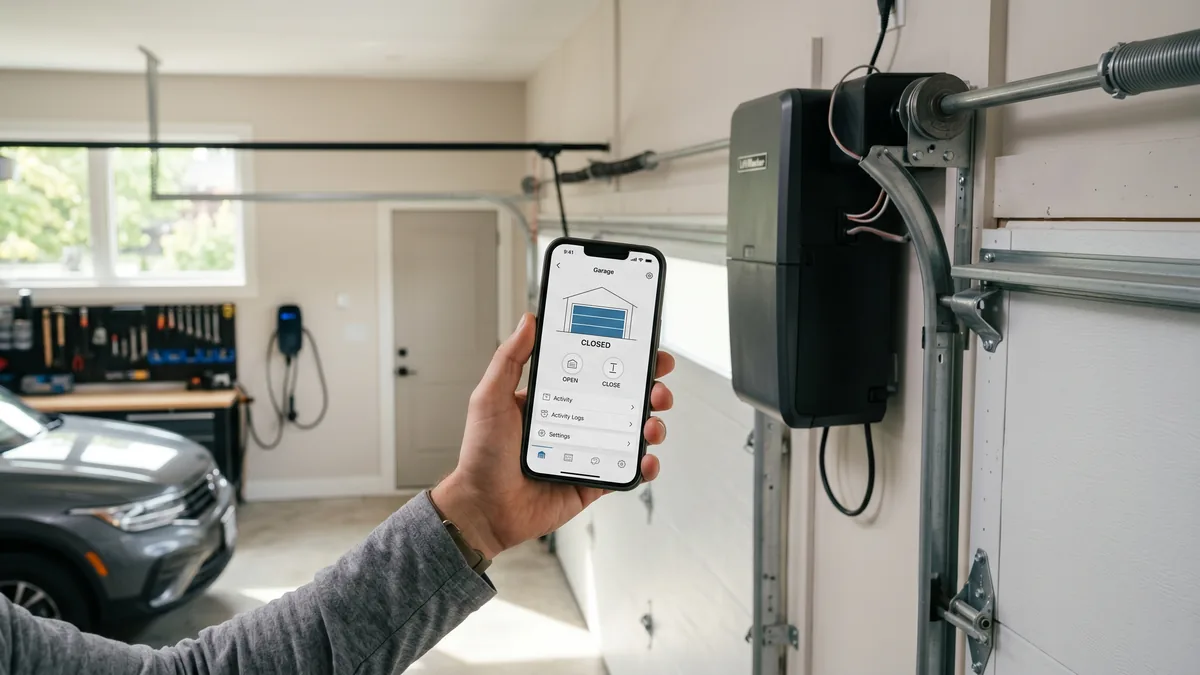
To set up LiftMaster myQ on an opener with built-in Wi-Fi, download the free myQ app, create an account, and add your garage door opener. Press the Wi-Fi or Learn button on the opener until the blue LED blinks, then enter your 2.4 GHz home Wi-Fi name and password when the app prompts you. When the light turns solid, test open and close from the app. The whole process takes about 10 to 15 minutes. For an older non-smart opener, the myQ hub retrofit is discontinued; choose a full smart/myQ opener from $760 supplied and installed.
What Is LiftMaster myQ?
myQ is LiftMaster’s smart-home platform that lets you open, close, and monitor your garage door from your phone anywhere with an internet connection. Modern LiftMaster openers have a Wi-Fi antenna and the myQ system built into the motor head. Royal Garage Doors no longer offers the discontinued myQ Smart Garage Hub retrofit for older non-smart openers.
If you have just installed a new LiftMaster opener — or you want to make an existing one smart — getting myQ connected is the step that turns it into a phone-controlled garage door. It is genuinely a do-it-yourself job for most homeowners, but a handful of small details (the 2.4 GHz Wi-Fi requirement chief among them) trip people up. Below is the exact process I walk GTA homeowners through, the troubleshooting fixes for every common error, and how to tell whether your opener already has myQ built in.
Before You Start: What You Need
myQ setup is fast when you have the right pieces ready. Before you climb a ladder, gather these:
- A myQ-enabled LiftMaster opener with built-in Wi-Fi. Look for a blue or yellow Wi-Fi antenna on the motor head and a small Wi-Fi LED.
- Your smartphone with the free myQ app installed from the App Store or Google Play.
- Your home Wi-Fi name and password, on a 2.4 GHz network. This is the single most important detail — myQ does not connect over 5 GHz.
- A strong Wi-Fi signal in the garage. Detached or far-corner garages across Toronto and Mississauga often have weak coverage; a mesh point or extender helps.
How to Set Up LiftMaster myQ: Step by Step
Follow these five steps in order. The on-screen wording varies slightly by opener model and app version, but the sequence is the same on every current LiftMaster.
Step 1 — Download the myQ App and Create an Account
Search “myQ” in the App Store or Google Play and install the official LiftMaster/Chamberlain app. Open it, choose Create Account, and enter your email, a password, and your address. The account is free and stores your devices, schedules, and shared users.
Step 2 — Add Your Device
Tap the plus (+) icon, then choose Garage Door Opener. Select your LiftMaster model from the list so the app can use the correct built-in Wi-Fi pairing flow.
Step 3 — Put the Opener in Wi-Fi Setup Mode
On the motor head, press and release the Wi-Fi button (some models use the Learn button) until the blue Wi-Fi LED blinks slowly. Blinking blue means the opener is broadcasting a temporary setup network and is ready to pair. If it does not blink, hold the button a few seconds longer, then release.
Step 4 — Connect the Opener to Your Wi-Fi
Follow the app prompts to join the opener’s temporary network (on some phones you confirm this in your phone’s Wi-Fi settings, then return to the app). Next, select your home 2.4 GHz network and type the password carefully. The opener uses this to reach the internet. When it succeeds, the blue LED turns solid.
Step 5 — Test Open and Close
Back in the app, your door now appears as a tile. Tap to open, wait, then tap to close, confirming the door responds and the app reports the correct status. Many people also enable open/close notifications here. That is it — myQ is live.
Built-In myQ vs. the Discontinued myQ Smart Garage Hub
The biggest source of confusion is whether you even need an extra device. It comes down to one thing: does your opener already have Wi-Fi built in?
| Your Opener | What You Need | How to Tell |
|---|---|---|
| LiftMaster made ~2017 or newer | Nothing extra — myQ is built in | Blue/yellow Wi-Fi antenna + blue Wi-Fi LED on motor head |
| LiftMaster/Chamberlain ~2011–2016 without built-in Wi-Fi | Full smart/myQ opener from $760 | Hub retrofit discontinued |
| Other non-smart opener | Full smart/myQ opener from $760 | Hub retrofit discontinued |
| Pre-1993 / no safety sensors | Replace the opener | No photo-eyes; very old logic board |
The former myQ Smart Garage Hub retrofit for a non-smart opener is discontinued and is not sold or installed by Royal Garage Doors. For supported smartphone control, choose a full myQ-enabled opener from $760 + tax supplied and installed.
Troubleshooting Common myQ Setup Problems
Roughly nine out of ten myQ headaches come down to Wi-Fi. Work through these in order before assuming the opener is faulty.
myQ Won’t Connect to Wi-Fi
- Check the band. The opener needs 2.4 GHz. If your router broadcasts 2.4 and 5 GHz under one name (band steering), temporarily split them or connect to the 2.4 GHz network during setup, then you can re-merge.
- Verify the password and watch for special characters or spaces the opener may misread.
- Move the router or add coverage. A weak garage signal causes pairing failures and drop-offs.
- Use WPA2 security. Some openers cannot join WPA3-only networks; set the router to WPA2 or WPA2/WPA3 mixed mode.
The Door Won’t Close From the App
This is by design. myQ requires aligned, functioning safety sensors to close remotely. Confirm the sensor LEDs are steady (not blinking), clear any obstruction, and make sure nothing is blocking the beam. If a sensor is damaged, see why a door reverses after hitting the floor and book a repair rather than disabling the sensors.
myQ Shows “Offline” After Working
An opener that paired then went offline almost always has a marginal Wi-Fi signal or a router that reassigned its IP. Restart the router, confirm the garage signal strength, and re-add the device if needed. A mesh node near the garage is the permanent fix.
The Wi-Fi LED Won’t Blink
If the blue LED never enters blinking setup mode, the opener may already be connected to an old network (factory-reset the Wi-Fi by holding the button longer), or the Wi-Fi module may have failed. A persistent no-light condition is worth a professional look — our LiftMaster repair techs see this occasionally on storm-damaged or aging boards.
What myQ Can Do Once It Is Set Up
Beyond basic open and close, the platform adds genuinely useful features for a busy household:
- Real-time status and history — see whether the door is open or closed and when it last moved.
- Open/close alerts — get a notification if the door is left open, ideal for forgetful mornings.
- Schedules and rules — auto-close at a set time each night.
- Guest access — share control with family members or a house guest without handing over a remote.
- Smart-home and voice integrations — works with select platforms and, on supported models, voice assistants.
For a feature comparison against other smart openers, our Genie vs. Chamberlain comparison is a useful read, since Chamberlain shares the myQ platform with LiftMaster.
myQ, Opener, and Installation Costs in the GTA
The myQ app itself is free, and so is everyday remote control. Here is what the surrounding hardware and service typically cost across Toronto and the GTA:
| Item / Service | Typical Cost (CAD) |
|---|---|
| myQ app + basic remote control | Free |
| myQ Smart Garage Hub retrofit | Discontinued / not offered |
| New myQ-enabled LiftMaster opener, supplied & installed | from $760 + tax |
| Safety sensor repair / replacement | $120–$180 + tax |
| Opener tune-up & maintenance | $120 + tax |
A full smart/myQ opener supply-and-install from $760 includes the unit, mounting, programming, and a working myQ connection set up for you. See full numbers on our pricing page and the detailed opener installation cost breakdown. Royal also offers a FREE service call with any repair or installation — a $120 diagnostic fee applies only if you choose not to proceed. Our workmanship is backed by a 1-year labour warranty, with 5-year hardware coverage on parts we supply.
Choosing or Replacing a Smart Opener
If your current opener is on its last legs, upgrading to a myQ-enabled LiftMaster solves the smart-control question and the reliability question at once. Compare options on our opener repair and door replacement pages, or read how LiftMaster stacks up in real homes from our verified customer reviews. You can always confirm your exact model’s features on the manufacturer’s official site, LiftMaster myQ, and check accessory standards through the DASMA trade association.
Want myQ Set Up Right the First Time?
Whether you need a new LiftMaster opener installed with myQ ready to go, or help getting an existing one online, Royal Garage Doors handles it across Toronto & the GTA. FREE service call with any installation, same-day appointments available.
Call 437-265-9995