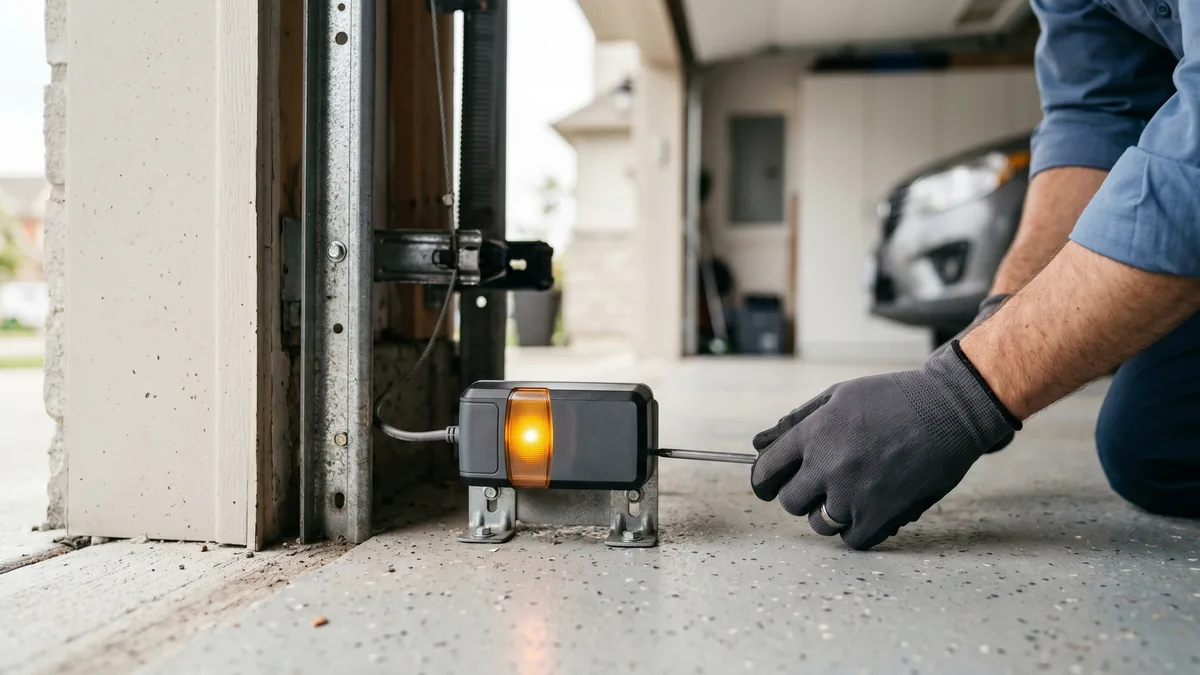
On a garage door sensor, a solid green light on the receiving eye means the infrared beam is aligned and unbroken, so the door is allowed to close. A steady red or amber light on the sending eye is normal — it just shows power. The problem light is a green that is off or blinking: it means the beam is broken by misalignment, a dirty lens, an obstruction, or a damaged wire. Realign the sensors until both lights glow steady and the door will close again.
What Are Garage Door Safety Sensors?
Garage door safety sensors — also called photo eyes or photoelectric sensors — are a pair of small units mounted about six inches above the floor on each side of the door. One sensor sends an invisible infrared beam across the opening; the other receives it. If anything breaks the beam while the door is closing, the opener stops and reverses the door. Required on every residential opener built since 1993, they are the system that protects children, pets, and cars from a closing door.
Of every service call we run across Toronto and the GTA, a stuck or flashing sensor light is one of the most frequent — and one of the easiest to fix yourself once you understand what each colour is actually telling you. This guide decodes the green and red lights on LiftMaster, Chamberlain, and Genie systems and walks you through the fix step by step.
What a Green Light Means
The green light lives on the receiving sensor — the eye that listens for the beam. When it glows a steady, solid green, it is telling you three things at once:
- The sensor has power. Voltage is reaching the eye through the opener terminals.
- The beam is being received. The infrared signal from the opposite sensor is landing squarely on the receiver.
- The path is clear and aligned. Nothing is blocking the beam and both brackets are pointed at each other.
When the green light is solid, your safety circuit is closed and healthy, and the opener will let the door travel all the way down. A green light is the goal of every sensor adjustment — if you can get it to stay solid, the door will close. If green is on but the door still will not close, the problem is elsewhere (force settings, travel limits, or the logic board), not the sensors.
What a Red Light Means (and Why It Is Often Fine)
Red is the colour that causes the most panic and the most confusion, because its meaning depends entirely on which sensor it is on.
Steady red on the sending sensor = normal
On many openers the sending sensor (the source eye) shows a steady red or amber LED at all times. This is completely normal. It is not an error; it simply confirms the transmitting eye has power and is throwing the beam. On LiftMaster and Chamberlain units this source light is usually amber or yellow; on Genie units it is often red. Either way, a steady source light is good news.
Off or blinking on the receiving sensor = the real problem
The light you actually care about is the green receiving eye. When that green light is dark or flashing, the receiver cannot see the beam. The door will refuse to close, or it will start down and immediately reverse with the opener lights flashing. The opener is doing its job: it assumes something is in the way and protects it. Your task is to find why the beam is broken.
Sensor Light Colour Chart by Brand
Because each manufacturer assigns colours differently, the same red light can mean "all good" on one brand and "check me" on another. Use this chart to read your specific opener:
| Brand | Sending Eye (source) | Receiving Eye (sensing) | Door Will Close When |
|---|---|---|---|
| LiftMaster | Amber / yellow, steady | Green, steady | Green is solid (not blinking) |
| Chamberlain | Amber / yellow, steady | Green, steady | Green is solid |
| Genie | Red, steady | Green, steady | Green is solid |
| Craftsman (Chamberlain-made) | Amber, steady | Green, steady | Green is solid |
| Linear / older units | Red or amber, steady | Green or red, steady | Receiver light is steady, not flashing |
The universal rule across every brand: both lights steady = good; a flickering or dark receiver = fix needed. Colour matters less than whether the receiving light holds steady.
How to Fix a Blinking or Dark Green Sensor Light
A flashing receiver light has four common causes. Work through them in this order — most GTA homeowners are back to a solid green within ten minutes.
Step 1: Clean both lenses
Dust, cobwebs, road salt, and condensation on the lens scatter the beam. In a Mississauga or Toronto garage, winter slush and spring pollen are frequent culprits. Wipe each lens gently with a soft, dry microfibre cloth. Do not use a wet rag or solvent, which can fog the plastic.
Step 2: Realign the brackets
A sensor that gets bumped by a bike, snowblower, or recycling bin tilts the bracket and breaks the beam. Loosen the wing nut holding the bracket, gently aim the receiving eye toward the sending eye, and tighten it the moment the green light goes solid. Both eyes must point straight at each other at the same height.
Step 3: Clear the path and check for glare
Confirm nothing — a garden hose, a stray box, a leaning shovel — sits in the beam path. Low winter sun streaming directly into the receiving eye can also "blind" it; shading the eye with your hand to test confirms sun glare as the cause.
Step 4: Inspect the wiring
If the lights are dim, off, or flicker randomly, suspect the wire. Follow the thin wire from each sensor up to the opener. Look for staples driven through it, kinks where it was pinched, or rodent damage — mice love chewing low sensor wires in detached and unheated GTA garages. A short here will kill one or both lights.
When Sensors Need Replacing (and What It Costs)
Cleaning and realignment fix the large majority of sensor light faults. But sensors do fail outright, and a few signs point to replacement rather than adjustment:
- No light at all on a sensor even after you confirm the wire is intact and powered.
- Water damage or corrosion inside the housing — common after flooding or years in a damp garage.
- Cracked housing or melted lens from impact or heat.
- The receiver will not hold a steady green no matter how carefully you align clean, dry, undamaged eyes.
Replacement sensors are inexpensive and brand-matched to your opener. In the GTA, professional sensor repair or replacement runs $120 to $180, including the parts, calibration, and a full safety test of the auto-reverse system. If you are already due for service, our auto-reverse safety test guide pairs perfectly with a sensor check, and a full annual maintenance visit ($120) folds the sensor calibration in with spring, roller, and balance checks.
Some sensor problems are actually symptoms of a deeper opener fault. If your green light is solid but the door still reverses, the issue may be the force or limit settings or a failing control board — in which case our garage door opener repair team can diagnose it on site. Homeowners outside our core area can find the nearest crew through our garage door repair near me page.
Key Takeaways
- Green = receiver, the light that matters. Solid green means aligned and clear; the door will close.
- Steady red or amber on the sender is normal — it only shows power.
- A blinking or dark green receiver is the warning. Clean, realign, clear the path, then check the wire.
- Both lights steady is the universal "all good" across LiftMaster, Chamberlain, and Genie.
- Never bypass the photo eyes — they are the door’s only crush-protection system.
- Replacement, if needed, costs $120–$180 in the GTA with calibration and a safety test included.
Sensor Light Still Not Going Green?
If your sensors won’t hold a steady green light after cleaning and realignment, the eyes, wiring, or opener board may need professional attention. Royal Garage Doors provides FREE service calls with any repair across Toronto & the GTA, with same-day appointments available.
Call 437-265-9995Frequently Asked Questions
References: LiftMaster Safety Reversing Sensors · U.S. Consumer Product Safety Commission – garage door entrapment protection standard.